
 zakaz@net-server.com.ua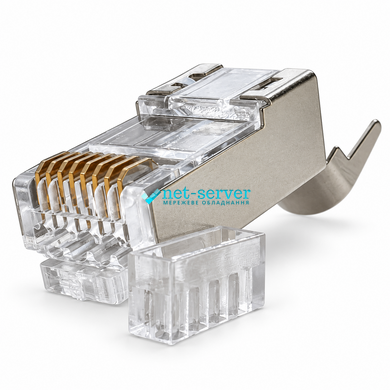




|
Quantity
|
Out of stock
|
||
|
|
|||
|
|
|||
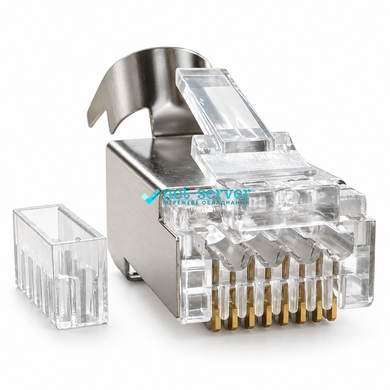
Net-Server NS-RJ45-STP-150 Cat.7 STP RJ45 Pass-Through Connector
The Net-Server NS-RJ45-STP-150 is a shielded RJ45 pass-through connector with a separate wire guide insert for terminating twisted-pair cable. Designed for assembling custom-length network cables and replacing connectors, it accommodates insulated conductors with an outside diameter of up to 1.5 mm.
The pass-through design allows the wires to extend through the front of the connector, making it easier to check their sequence before crimping. The separate wire guide insert helps arrange the conductors and guide them into the appropriate channels.
Features and Benefits
- Pass-through design: allows visual verification of the wire sequence before completing the termination.
- Wire guide insert: helps position the conductors correctly and keep them aligned during assembly.
- Metal shielding: provides a connection point for the cable shield to maintain shielding continuity.
- Supports insulated conductors up to 1.5 mm: accommodates cables with a compatible individual insulated conductor diameter.
- Rear metal cable clamp: secures the cable and reduces mechanical strain on the contact area.
- Transparent plastic components: make it easier to inspect wire positioning during installation.
Technical Specifications
| Brand | Net-Server |
| Model | NS-RJ45-STP-150 |
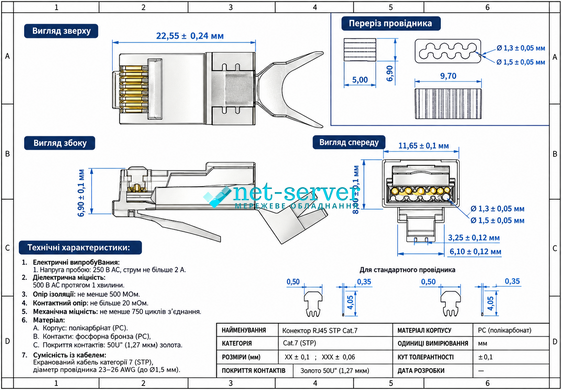
| Connector type | RJ45, 8P8C, male plug |
| Design | Pass-through with a separate wire guide insert |
| Manufacturer-designated category | Cat.7 |
| Shielding | STP, metal shield |
| Number of contacts | 8 |
| Individual conductor diameter, including insulation | Up to 1.5 mm |
| Termination method | Crimping with a compatible tool |
| Cable retention | Rear metal cable clamp |
Applications
This connector is intended for terminating shielded twisted-pair cables in local area networks, including connections to computers, switches, routers and other equipment with RJ45 ports. It is suitable for installation and repair work, provided that the cable and crimping tool are compatible with the connector design.
Installation Recommendations
Before installation, check that the connector is compatible with the cable’s conductor size and type. Arrange the wires according to the selected T568A or T568B wiring scheme, then feed them through the wire guide insert and connector body. Verify the wire sequence, crimp the connector and trim the protruding ends flush with the front face.
Use a pass-through crimping tool compatible with this metal housing design. Ensure electrical contact between the cable shield and the connector’s metal shield, then secure the cable with the rear clamp. After termination, check the completed connection with a cable tester.
Frequently Asked Questions
What is a pass-through connector?
A pass-through connector allows the wires to extend through the front of the housing. This makes it possible to check their sequence before crimping. The protruding wire ends are trimmed when completing the termination.
What is the wire guide insert used for?
The insert guides the wires into their respective channels and helps keep them aligned as they are inserted into the connector body.
What does the 1.5 mm dimension mean?
It is the maximum stated outside diameter of an individual conductor including its insulation. It does not refer to the overall cable diameter or the bare metal conductor diameter, and it does not directly specify an AWG size.
Can I use a standard RJ45 crimping tool?
Not every tool is suitable. The tool must support pass-through connectors and accommodate this model’s housing shape. Check the compatibility of the crimping die and wire-cutting mechanism before installation.