 zakaz@net-server.com.ua
How to choose an RJ45 connector: Cat5e, Cat6, Cat6A, UTP or FTP
When installing an internet cable, local area network or video surveillance system, it is important to choose not only the right cable, but also the right RJ45 connector. The stability of the connection, data transfer speed and reliability of the entire network depend on the quality of the connector, its compatibility with the cable and correct crimping.
At first glance, all RJ45 connectors look similar, but in practice they differ by category, cable type, design, shielding, conductor diameter and installation method.
In this article, we will look at how to choose the right RJ45 connector for Cat5e, Cat6 or Cat6A cable, what the difference is between UTP, FTP and STP connectors, when it is better to use a pass-through connector, and when a standard connector is enough.
What is an RJ45 connector
RJ45 is a network connector used to connect an Ethernet cable to routers, switches, patch panels, CCTV cameras, computers, internet outlets and other network equipment.
In everyday use, these connectors are usually called RJ45, although technically Ethernet most often uses an 8P8C connector. It has 8 contacts and is designed for crimping twisted pair cable.
RJ45 connectors are used together with:
- twisted pair cable;
- patch cords;
- patch panels;
- RJ45 network modules;
- RJ45 internet outlets;
- crimping tools.
Main types of RJ45 connectors
Before buying, it is important to understand that RJ45 connectors come in different types. Most often they are classified by the following parameters:
- category: Cat5e, Cat6, Cat6A;
- cable type: UTP, FTP, STP;
- design: standard or pass-through;
- cable conductor type: solid or stranded;
- presence or absence of shielding;
- compatibility with conductor diameter.
An incorrectly selected connector can worsen the contact, reduce data transfer speed or lead to unstable network operation.
RJ45 connector Cat5e, Cat6 or Cat6A
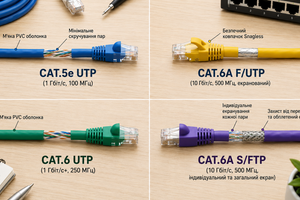
The connector category should match the cable category. If you use Cat6 cable, it is better to choose a Cat6 connector. If Cat6A cable is used, you should choose a Cat6A connector or a special shielded connector that supports the required characteristics.
| Connector category | Suitable cable | Where to use |
|---|---|---|
| Cat5e | Cat5e | Home internet, office networks, IP cameras, standard gigabit connections |
| Cat6 | Cat6, sometimes Cat5e | Offices, server rooms, patch panels, networks with a greater stability margin |
| Cat6A | Cat6A | High-load networks, shielded lines, modern cable infrastructure |
Important: a lower-category connector can limit the capabilities of the cable. For example, if you install a simple Cat5e connector on a Cat6A cable, the network may not provide the expected stability and performance.
You can read more about the difference between categories in the article what is the difference between Cat5e and Cat6.
UTP, FTP or STP RJ45 connector
One of the most important parameters is the connector type by shielding.
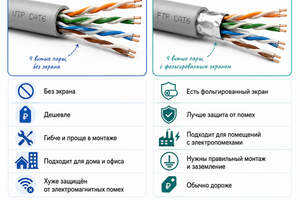
UTP RJ45 connector is used for unshielded twisted pair cable. This is the most common option for apartments, private houses, small offices and standard networks.
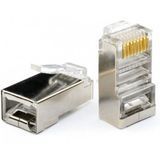
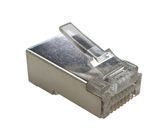
FTP or STP RJ45 connector has a metal housing or shielding elements. It is used with shielded cable when it is necessary to reduce the influence of electromagnetic interference.
| Connector type | Suitable cable | When to choose |
|---|---|---|
| UTP | Unshielded twisted pair | Apartment, house, office, standard installation conditions |
| FTP | Shielded twisted pair | Installation near power cables, server rooms, difficult installation conditions |
| STP | Shielded cables with additional protection | Industrial facilities, networks with increased requirements for protection against interference |
If the cable is shielded but a regular UTP connector is installed, the shielding may work incorrectly or may not perform its function at all. For shielded cable, you need to use a suitable FTP or STP connector.
You can read more about the differences between cable types in the article what is the difference between UTP and FTP.
Pass-through or standard RJ45 connector
RJ45 connectors can be standard or pass-through.
Standard RJ45 connector is the classic option where the cable conductors are inserted into the connector until they stop. This type is widely used for standard installation.
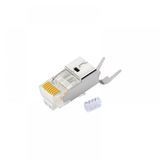
Pass-through RJ45 connector allows the cable conductors to pass through the connector body. This makes it easier to align the wires according to the T568A or T568B wiring scheme and reduces the risk of mistakes during crimping.
| Connector type | Advantages | When to use |
|---|---|---|
| Standard RJ45 | Affordable price, versatility, wide selection | For standard installation and experienced installers |
| Pass-through RJ45 | Easier wire alignment, fewer crimping mistakes | For quick installation, a large number of connections or beginners |
Pass-through connectors require a suitable crimping tool that not only crimps the contacts but also cuts off the excess wire ends.
You can read how to crimp correctly in the article how to crimp an RJ45 cable.
RJ45 connector for solid and stranded cable
When choosing a connector, it is important to consider the cable conductor type.
Solid cable is usually used for fixed installation in walls, cable ducts, server rooms or office networks.
Stranded cable is more often used in ready-made patch cords because it is more flexible and better withstands frequent bending.
Not all connectors work equally well with both cable types. If the connector does not match the conductor type, the contact may be unreliable.
Which connector to choose for internet
For regular home internet, a Cat5e or Cat6 UTP RJ45 connector is usually enough.
If the cable is laid from the router to a computer, TV, access point or internet outlet, the most common options are:
- RJ45 Cat5e UTP — for standard gigabit connections;
- RJ45 Cat6 UTP — if you need a greater stability margin;
- pass-through RJ45 — if you need fast and convenient crimping.
For most home tasks, there is no need to overpay for a shielded connector if a standard unshielded cable is used.
Which connector to choose for video surveillance
For IP CCTV cameras, RJ45 Cat5e or Cat6 connectors are usually used. If the camera is powered via PoE, it is especially important that the contact is reliable and that the cable and connector match each other.
For cameras, it is recommended to:
- use high-quality RJ45 connectors;
- choose the connector according to the cable category;
- use an FTP or STP connector for shielded cable;
- check the crimping quality after installation;
- use solutions resistant to moisture and outdoor conditions for outdoor lines.
You can read more about choosing a cable for cameras in the article which cable to choose for video surveillance.
Which RJ45 connector to choose for PoE
For PoE, not only the cable quality matters, but also the connector quality. RJ45 transmits not only data but also power, so poor contact can lead to heating, voltage loss or unstable equipment operation.
For PoE, it is recommended to:
- use connectors of the appropriate category;
- not save money on contact quality;
- choose the connector according to the cable type: UTP or FTP;
- use copper cable instead of CCA;
- check the crimping quality with a tester.
You can read more about choosing cable for PoE in the article which cable to choose for PoE.
What to pay attention to when choosing an RJ45 connector
Before buying an RJ45 connector, pay attention to the following parameters:
- connector category: Cat5e, Cat6 or Cat6A;
- cable type: UTP, FTP or STP;
- compatibility with conductor diameter;
- cable type: solid or stranded;
- contact quality;
- shielding for FTP/STP cable;
- compatibility with the crimping tool;
- design type: standard or pass-through.
If you need to install a large number of connections, it is better to immediately choose high-quality crimping tools and check each cable line with a cable tester.
Common mistakes when choosing an RJ45 connector
- using a Cat5e connector for Cat6A cable;
- installing a UTP connector on shielded FTP cable;
- using low-quality cheap connectors for PoE;
- incorrect crimping scheme;
- poorly aligned conductors before crimping;
- using an unsuitable crimping tool;
- not checking the cable after installation;
- choosing a connector without considering the conductor diameter.
What products are used together with RJ45 connectors
For high-quality network installation, RJ45 connectors are often used together with:
- RJ45 connectors;
- twisted pair cable;
- patch cords;
- crimping tools;
- RJ45 network modules;
- RJ45 internet outlets;
- patch panels;
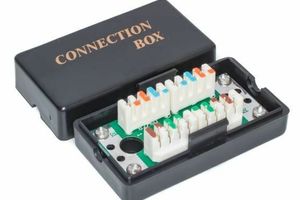
- cable junction boxes.
Properly selected components help avoid signal loss, poor contact and unstable network operation.
FAQ
Which RJ45 connector is needed for Cat5e?
For Cat5e cable, a Cat5e RJ45 connector is usually used. It is suitable for most home and office networks with speeds up to 1 Gbit/s.
Can I use a Cat6 connector for Cat5e cable?
In many cases, yes, but you need to check compatibility with the conductor diameter and cable design.
Which connector is needed for FTP cable?
For FTP cable, you need to use a shielded RJ45 connector that provides contact with the cable shield.
Which is better — pass-through or standard RJ45?
A pass-through connector is more convenient for installation and reduces the risk of mistakes when aligning the wires. A standard connector is cheaper and works well for standard installation.
Do I need a special connector for PoE?
A separate special connector is not always required, but for PoE it is important to use a high-quality RJ45 connector of the appropriate category and perform the crimping correctly.
Useful categories
- RJ45 connectors
- Twisted pair cable
- Patch cords
- Crimping tools
- RJ45 network modules
- RJ45 internet outlets
Useful articles
- How to crimp an RJ45 cable
- What is the difference between Cat5e and Cat6
- What is the difference between UTP and FTP
- Copper cable or CCA bimetal cable
- Which cable to choose for PoE
Conclusion
To choose the right RJ45 connector, you need to consider the cable category, shielding type, conductor diameter, installation conditions and the equipment that will be connected to the network.
For regular home internet, RJ45 Cat5e or Cat6 UTP is usually enough. For shielded cable, FTP or STP connectors should be used. For PoE, video surveillance and office networks, it is better to choose high-quality connectors of the appropriate category and check the crimping after installation.
Need help choosing RJ45 connectors? Net-Server specialists will help you choose connectors, twisted pair cable, crimping tools and other components for stable operation of your network.
```