 zakaz@net-server.com.ua
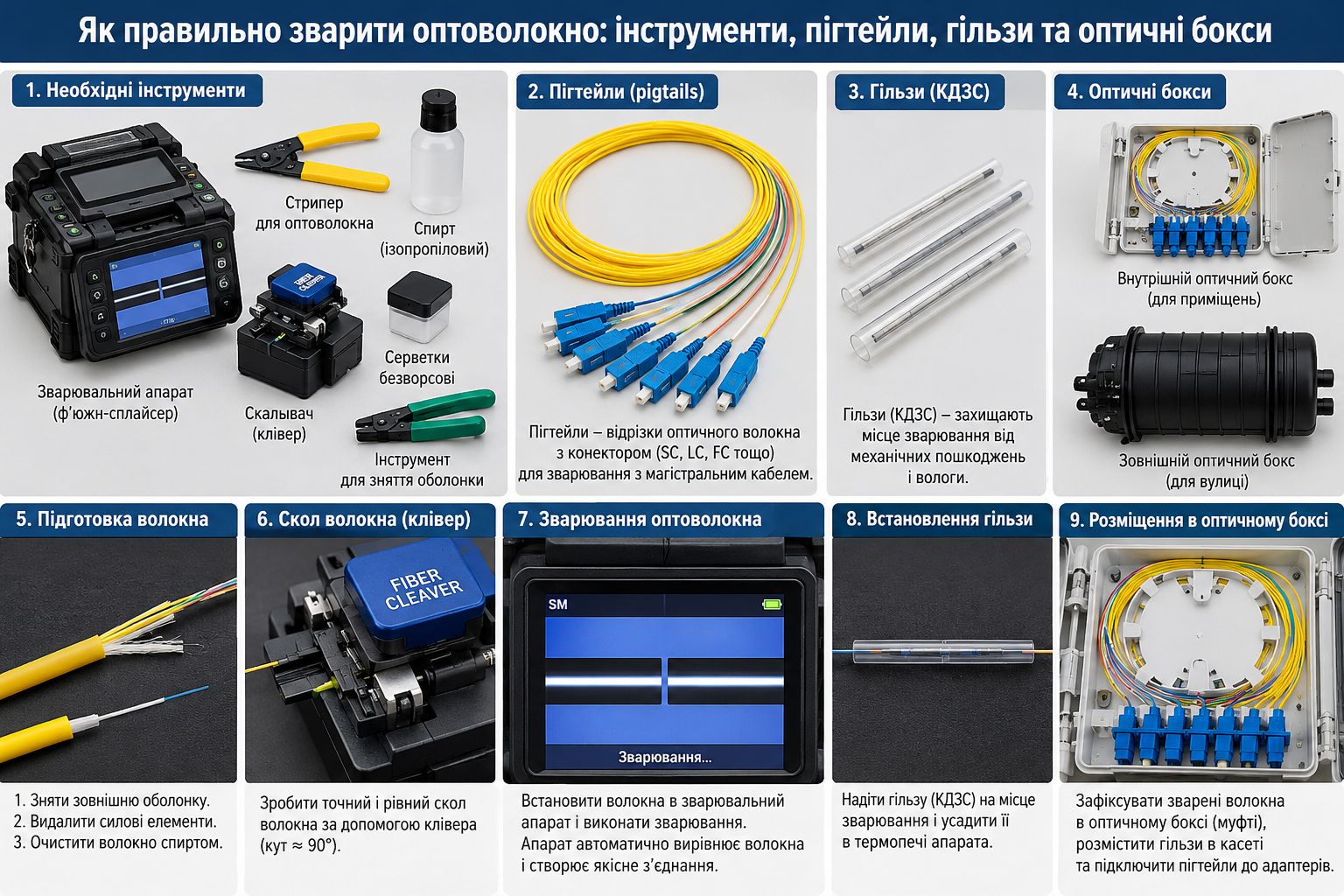
How to Fusion Splice Fiber Optic Cable: Tools, Pigtails, Splice Sleeves and Fiber Optic Boxes
Fiber optic fusion splicing is one of the most common methods of creating a reliable connection between optical fibers. It is used when installing internet networks, connecting private homes, deploying FTTH and GPON networks, establishing connections between buildings, repairing cable lines and installing fiber optic equipment.
To achieve a high-quality connection with minimal optical loss, purchasing a fiber optic fusion splicer alone is not enough. Specialized fiber preparation tools, a precision fiber cleaver, cleaning materials and heat-shrink splice protection sleeves are also required. Fiber optic boxes, splice closures and splice trays are used to organize and protect the completed connections.
In this article, we will explain how to prepare fiber optic cable for fusion splicing, which tools professional technicians use, how to splice optical fibers, why fiber optic pigtails and splice protection sleeves are needed, how to check splice quality and how to properly arrange fibers inside a fiber optic box or splice closure.
What Is Fiber Optic Fusion Splicing?
Fiber optic fusion splicing is a technology used to join two optical fibers by precisely aligning their glass ends and locally heating them with an electric arc.
During the splicing process, a specialized machine aligns the prepared fibers, brings them together and creates a permanent connection. A properly performed fusion splice provides low signal loss and high stability of the optical link.
Fusion splicing is used for:
- joining two sections of fiber optic cable;
- repairing damaged optical fibers;
- fusion splicing fiber optic pigtails;
- installing fiber optic termination boxes and patch panels;
- joining fibers inside optical splice closures;
- distributing fibers in FTTH, FTTB and GPON networks;
- building backbone and local fiber optic links;
- connecting server rooms, warehouses, offices and other facilities.
Unlike connections made using detachable optical connectors, fusion splicing creates a permanent joint. If the connection needs to be changed, the fibers must be prepared and spliced again.
What Do You Need for Fiber Optic Fusion Splicing? Complete Tool List
Professional fiber optic installation requires several tools and consumable materials. Each serves a specific purpose.
| Tool or Material | Purpose |
|---|---|
| Fiber optic fusion splicer | Precisely aligns and joins two optical fibers |
| Fiber optic stripper | Removes the protective coating from the optical fiber |
| Fiber optic cleaver | Produces a precise and even fiber end face before fusion splicing |
| Cable jacket stripping tool | Prepares the outer cable jacket and fiber tubes |
| Kevlar scissors | Cuts aramid strength members inside fiber optic cables |
| Isopropyl alcohol and lint-free wipes | Remove coating residue and contamination from optical fibers |
| Splice protector (heat-shrink sleeve) | Provides mechanical protection for the fusion splice |
| Fiber optic splice tray | Organizes optical fibers and holds protected splice connections |
| Fiber optic pigtail | Provides a connectorized termination through fusion splicing |
| Fiber optic box or splice closure | Houses and protects optical connections |
| Fiber optic tester or OTDR | Checks optical loss and the condition of the fiber optic link |
Many of these components are available in the Net-Server catalog, including fusion splicers, fiber optic tools, splice protection sleeves, pigtails and connection protection accessories.
How to Choose a Fiber Optic Fusion Splicer
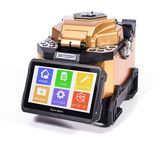
A fusion splicer is the main piece of equipment used to create fiber optic connections. Modern models can automatically detect fiber positions, align the fibers, perform the splice and estimate optical loss at the connection point.
When selecting a fusion splicer, consider:
- supported optical fiber types;
- fiber alignment method;
- positioning accuracy;
- availability of automatic splicing programs;
- built-in heater for heat-shrink splice protection sleeves;
- battery capacity for field installation;
- electrode cleaning and replacement options;
- availability of technical service and maintenance;
- compatible fiber holders;
- included tools and accessories.
Core Alignment vs. Cladding Alignment
Fusion splicers may use different fiber alignment methods.
- Core Alignment — aligns optical fibers according to the position of their cores. These systems are used for precision splicing, particularly when minimizing optical loss is important.
- Cladding Alignment — aligns fibers according to the external geometry of the glass cladding. These machines are also used in fiber optic network installation, but the results depend on fiber geometry and equipment accuracy.
For regular professional work, it is important to choose a fusion splicer with suitable programs, an accurate alignment system and calibration capabilities.
The Net-Server fusion splicer catalog includes SKYCOM and Fitel equipment, as well as compatible accessories. Before purchasing, check the specifications and included components of the particular model.
Why Do You Need a Fiber Optic Stripper?
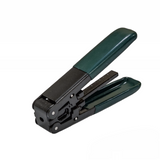
A fiber optic stripper is a specialized tool designed to remove protective coatings from optical fibers without damaging the glass.
Optical fibers typically have a glass cladding diameter of 125 microns and a primary protective coating that often increases the overall diameter to approximately 250 microns. Some fibers also have a secondary 900-micron buffer coating.
Before fusion splicing, the appropriate coating must be carefully removed without scratching the glass fiber.
For this purpose, technicians use fiber optic strippers, including specialized Miller-type stripping tools.
Using a regular utility knife or a tool intended for copper cables to remove the primary coating is not recommended. Such tools can damage the glass and weaken the splice.
What Is a Fiber Optic Cleaver Used For?
A fiber optic cleaver is one of the most important tools for achieving high-quality fusion splices.
Its purpose is to produce a smooth glass fiber end face with minimal deviation from a perpendicular cut.
If the fiber end face contains irregularities, cracks or an incorrect cleave angle, the fusion splicer may report an error, and the resulting connection may exhibit increased optical loss.
A high-quality fiber cleaver helps to:
- produce a precise fiber end face;
- improve splice consistency;
- reduce the number of repeated splices;
- minimize the risk of defective connections;
- speed up fiber optic installation.
Before fusion splicing, use a cleaver compatible with the optical fiber type and the fiber holders of the fusion splicer.
How to Fusion Splice Fiber Optic Cable: Step-by-Step Instructions
The exact splicing procedure depends on the fusion splicer model, cable construction and installation conditions. The following is a general professional workflow.
Step 1. Prepare the Work Area and Tools
Before starting, prepare the fusion splicer, fiber cleaver, stripper, cleaning materials, splice protection sleeves, necessary pigtails and a fiber optic box or splice closure.
The work surface should be clean, dry and protected from excessive dust and wind. During field installation, technicians often use a dedicated worktable or protective tent.
Before working, ensure that the fiber has been disconnected from active optical sources. Never look directly into the end of an optical connector or fiber, as laser radiation may be invisible to the human eye.
Step 2. Prepare the Fiber Optic Cable
Using an appropriate cable preparation tool, remove the outer cable jacket to the length specified in the installation instructions for the fiber optic box or splice closure.
During preparation, it is important to:
- avoid damaging fiber tubes and optical fibers;
- carefully trim strength members;
- leave sufficient cable length for securing it inside the enclosure;
- remove water-blocking gel from the fibers, if present;
- provide enough spare fiber length for routing inside the splice tray;
- observe the minimum cable bend radius.
If the cable contains aramid or Kevlar strength members, use specialized Kevlar scissors to cut them.
Step 3. Slide a Splice Protection Sleeve onto the Fiber
Before fusion splicing, slide a splice protector or heat-shrink protection sleeve onto one of the prepared fibers.
This must be done before joining the fibers because it will no longer be possible to slide the sleeve over the completed splice afterward.
The sleeve must be compatible with the fiber construction, splice protection requirements and holders inside the splice tray.
Step 4. Remove the Primary Coating from the Optical Fiber
Use a fiber optic stripper to remove the coating from the required section of fiber according to the specifications of the fusion splicer and cleaver.
Work carefully without applying excessive pressure to avoid scratches or microcracks in the glass.
After removing the coating, do not touch the exposed glass with your fingers.
Step 5. Clean the Optical Fiber
Clean the exposed glass fiber with a lint-free wipe and a suitable cleaning agent, such as high-purity isopropyl alcohol.
Cleaning removes:
- residual protective coating;
- dust;
- oily contamination;
- other particles that could affect splice quality.
Use clean wipes and follow the cleaning agent manufacturer's instructions. Avoid contaminating the prepared fiber.
Step 6. Precisely Cleave the Fiber
Place the cleaned optical fiber into the cleaver and perform the cleave according to the tool manufacturer's instructions.
The prepared fiber length and cleaving parameters must meet the requirements of the particular fusion splicer and fiber holder type.
If the fiber end face is damaged or the cleave angle is incorrect, repeat the cleaving process.
Step 7. Place the Fibers into the Fusion Splicer
Insert the prepared optical fibers into the designated holders of the fusion splicer.
Make sure that:
- the fibers are correctly positioned in the guides;
- the glass end faces are clean;
- the fibers are not damaged;
- the holders securely position the fibers;
- the appropriate splicing program has been selected.
The fusion splicer then checks the position and condition of the prepared fibers.
Step 8. Perform the Fiber Optic Fusion Splice
After starting the program, the fusion splicer aligns the fibers and joins them using an electric arc.
Depending on the equipment model, the process may include automatic fiber alignment, end-face inspection, preliminary heating and the actual fusion splice.
When the process is complete, the machine usually displays an estimated optical loss value for the splice.
Important: the splice loss value displayed by the fusion splicer is a calculated estimate, not a complete measurement of the fiber optic link. Final splice quality should be verified using appropriate optical testing equipment.
Step 9. Protect the Splice with a Heat-Shrink Sleeve
After fusion splicing, carefully slide the heat-shrink protection sleeve over the connection so that it covers the splice and the adjacent fiber sections.
Place the sleeve into the built-in heater of the fusion splicer or another compatible heating device.
Heat causes the sleeve to shrink and create mechanical protection around the splice.
After heating, allow the protected fiber to cool according to the manufacturer's instructions.
Step 10. Place the Spliced Fiber into a Splice Tray
Once the protective sleeve has cooled, secure the completed splice inside a fiber optic splice tray.
Carefully arrange spare fiber length inside the tray without sharp bends, twisting or excessive tension.
Observe the permitted fiber bend radius and use the splice protector holders provided in the tray.
Step 11. Close the Fiber Optic Box or Splice Closure
After all fibers have been arranged, check the cable routing and close the protective enclosure.
If the installation is outdoors, inside a cable chamber or on a utility pole, seal the cable entries correctly and use an enclosure designed for the relevant operating conditions.
Step 12. Test the Splice Quality
After installation, the fiber optic link should be tested. Testing makes it possible to evaluate the actual condition of the connections, verify signal levels and identify potential defects.
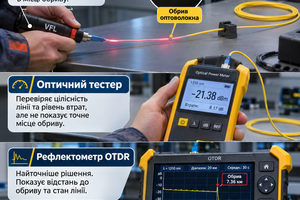
For this purpose, technicians use an optical light source with a power meter, an Optical Time Domain Reflectometer (OTDR) and other appropriate testing instruments.
What Are 40 mm, 45 mm and 60 mm Heat-Shrink Splice Sleeves Used For?
A splice protector is a specialized protective sleeve installed over a fusion-spliced optical fiber.
It helps protect the splice against accidental mechanical damage during fiber routing, installation and maintenance.
Net-Server offers splice protection sleeves in different lengths, including 40, 45 and 60 mm.
| Sleeve Length | Typical Application |
|---|---|
| 40 mm | Compact option for compatible splice trays and smaller fiber optic enclosures |
| 45 mm | Intermediate size for splice trays and holders designed for this sleeve length |
| 60 mm | Common size for standard fusion splice connections in compatible fiber optic boxes and splice closures |
When selecting a sleeve, check its compatibility with the splice tray, fiber type, splice protection requirements and fusion splicer heater.
Explore fiber optic splice protectors and accessories at Net-Server.
What Is a Fiber Optic Pigtail and Why Is It Fusion-Spliced?
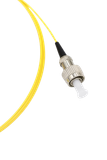
A fiber optic pigtail is a short length of optical fiber with a connector installed on one end. The other end is intended to be fusion-spliced to the main fiber optic cable.
Pigtails are used when a fiber optic cable needs to be terminated and connected to active equipment through a fiber optic adapter and patch cord.
A typical connection layout is:
Fiber Optic Cable → Fusion Splice → Pigtail → Adapter → Patch Cord → SFP Module or Media Converter
The Net-Server fiber optic pigtail catalog includes different connector types.
- SC — commonly used in FTTH, GPON, fiber optic boxes and subscriber connections;
- LC — widely used in SFP modules and server equipment;
- FC — used in specialized optical equipment;
- ST — found in certain fiber optic systems and existing infrastructure.
The connector polish type must also be checked — UPC or APC. These two connector types must not be directly mated with each other.
Can G.652D Be Fusion-Spliced to G.657.A1 or G.657.A2?
During fiber optic installation, technicians often need to join singlemode fibers of different standards, such as G.652D and G.657.A1 or G.657.A2.
Fusion splicing these fibers may be possible when the specific fibers are compatible and the appropriate fusion splicer program is selected.
However, differences in fiber characteristics must be considered. They may affect the estimated loss displayed by the fusion splicer and the results of OTDR measurements.
For critical optical links, it is advisable to check fiber manufacturer recommendations, use appropriate splicing programs and verify the results with optical testing equipment.
Fiber Optic Box or Splice Closure: Where Should Spliced Fibers Be Installed?
After fusion splicing, the optical fibers must be properly organized and protected.
For this purpose, technicians use fiber optic boxes or fiber optic splice closures.
| Equipment | Main Purpose | When to Choose |
|---|---|---|
| Mini fiber optic box | Compact housing for a small number of connections | Small subscriber connections |
| Wall-mounted fiber optic box | Cable termination, pigtail and adapter installation | Homes, offices, server rooms and technical facilities |
| 19-inch fiber optic patch panel | Organizing fiber optic connections inside a server cabinet | Server rooms, telecommunications installations and larger numbers of connections |
| Fiber optic splice closure | Joining, repairing or branching fiber optic cable lines | Outdoor routes, utility poles, cable chambers and other suitable installation locations |
If the cable needs to be terminated near network equipment, a fiber optic termination box or patch panel is usually used. If two cables need to be joined somewhere along the route, a suitable splice closure is generally installed.
How to Check the Quality of a Fiber Optic Fusion Splice
A high-quality splice must meet the project requirements for optical loss, mechanical reliability and stable operation.
Splice quality can be checked at several levels.
1. Inspection Using the Fusion Splicer
After fusion splicing, the machine displays an approximate splice loss estimate and may report defects in the fibers or the connection.
This estimate is useful for immediate quality control but does not replace testing the completed optical link.
2. Measuring Optical Loss
An optical light source and optical power meter can be used to evaluate the total attenuation of the fiber optic link.
Allowable losses depend on cable length, the number of splices, connectors, operating wavelength and the requirements of the installed equipment.
3. OTDR Testing
An Optical Time Domain Reflectometer (OTDR) allows technicians to examine the optical link, locate irregularities and damage, evaluate connections and analyze losses along different sections of the route.
For accurate measurements, the OTDR must be configured correctly, the appropriate wavelength selected, suitable launch and receive fibers used where necessary, and the characteristics of the link taken into account.
4. Visual Fault Locator (VFL) Testing
A Visual Fault Locator (VFL) can help identify major fiber breaks, severe bends and certain faults in accessible sections of the cable.
However, a VFL cannot replace an OTDR or optical loss test set and cannot accurately measure the attenuation of a properly completed fusion splice.
Why Can Optical Loss Be High After Fusion Splicing?
Even when high-quality equipment is used, various problems can negatively affect fusion splice performance.
Common causes include:
- fiber contamination before splicing;
- poor fiber cleaving;
- glass fiber damage caused by the stripper;
- incorrect fusion splicer program;
- dirty V-grooves inside the fusion splicer;
- worn or contaminated electrodes;
- improper preparation of different fiber types;
- excessive fiber bending after splicing;
- mechanical tension at the splice;
- mistakes when arranging fibers inside the splice tray.
If the fusion splicer reports an error or an unsatisfactory result, the cause must be identified. In many cases, the appropriate solution is to clean, cleave and splice the fibers again.
Safety Precautions When Fusion-Splicing Optical Fibers
Working with optical fibers requires particular care. Fiber cleaving produces extremely small glass fragments that can injure the skin or enter the eyes.
During installation:
- wear appropriate safety glasses;
- collect fiber scraps in a dedicated closed disposal container;
- never leave glass fragments on the work surface;
- avoid touching your eyes while working;
- never look directly into the ends of optical fibers or connectors;
- make sure the fiber is disconnected from active optical sources;
- keep alcohol-based cleaning agents away from ignition sources;
- follow the operating instructions for the fusion splicer and heater;
- avoid excessive fiber bending or tension.
Fiber optic fusion splicing and testing should preferably be performed by trained technicians experienced with the relevant equipment.
Common Mistakes When Fusion-Splicing Fiber Optic Cable
- forgetting to slide the splice protection sleeve onto the fiber before splicing;
- using general-purpose tools instead of a fiber optic stripper;
- failing to clean the fiber before cleaving;
- touching prepared fiber end faces with fingers;
- using a dirty or incorrectly adjusted fiber cleaver;
- selecting an unsuitable fusion splicer program;
- not checking the condition of electrodes and fiber guides;
- using an incompatible heat-shrink splice protection sleeve;
- incorrectly placing splices inside the splice tray;
- creating excessive bends in the fibers;
- not leaving sufficient fiber slack for maintenance;
- failing to label spliced fibers;
- relying only on the fusion splicer's estimated loss value;
- not testing the completed fiber optic link.
Products Commonly Purchased for Fiber Optic Fusion Splicing
The following products may be required for a complete fiber optic installation:
- fiber optic fusion splicers — for joining prepared optical fibers;
- fiber optic strippers and installation tools — for fiber preparation, coating removal and maintenance of optical connections;
- 40, 45 and 60 mm splice protection sleeves — for mechanical protection of fusion-spliced fibers;
- lint-free fiber optic cleaning wipes — for cleaning optical fibers and components;
- SC, LC, FC and ST fiber optic pigtails — for fusion splicing to the main fiber optic cable and providing connectorized terminations;
- fiber optic splice trays — for securing and organizing protected fusion splice connections;
- fiber optic termination boxes — for cable termination and installation of pigtails and adapters;
- fiber optic splice closures — for joining, branching and protecting fiber optic cable lines;
- fiber optic patch panels — for organizing optical fibers and connections inside server cabinets;
- fiber optic adapters — for connecting compatible SC, LC, UPC and APC connectors;
- fiber optic patch cords — for connecting a fiber optic box or patch panel to network equipment;
- fiber optic cables — for building fiber optic links between connection points.
FAQ — Frequently Asked Questions
How Do You Fusion Splice Fiber Optic Cable?
First, prepare the cable, strip the protective coating, clean the glass fiber and perform a precise cleave. Then place the fibers into a fusion splicer and run the appropriate splicing program. Afterward, protect the connection using a heat-shrink splice sleeve and arrange it inside a splice tray.
What Tools Are Needed for Fiber Optic Fusion Splicing?
The basic equipment includes a fusion splicer, fiber optic stripper, precision cleaver, cable preparation tools, cleaning materials, splice protection sleeves and accessories for organizing the connections.
Can Fiber Optic Cable Be Spliced Without a Fusion Splicer?
Electric-arc fusion splicing requires a specialized fusion splicer. Mechanical fiber joining methods also exist, but they use special mechanical connectors and are a different technology that cannot replace fusion splicing in every application.
Is a Fiber Cleaver Necessary for Fusion Splicing?
Yes. A high-quality cleave is essential for achieving a fiber optic connection with low optical loss. A specialized precision fiber cleaver is used for this purpose.
Why Is a Heat-Shrink Splice Sleeve Needed?
A heat-shrink splice sleeve protects the fusion splice against mechanical damage. After shrinking and cooling, the protected connection is placed into a designated holder inside the splice tray.
Which Splice Sleeve Should You Choose: 40, 45 or 60 mm?
The sleeve length should be selected according to the splice tray design, the available holders and the requirements of the splice connection. Compatibility with the particular equipment must be checked.
What Is a Fiber Optic Pigtail Used For?
A pigtail provides a connectorized termination for an optical fiber. One end is fusion-spliced to the main cable, while the connectorized end is connected through a compatible fiber optic adapter.
Can Singlemode and Multimode Fibers Be Fusion-Spliced Together?
This should not be used as a standard solution for a network connection. Singlemode and multimode fibers have different optical characteristics, which may result in significant losses and equipment incompatibility.
Can G.652D and G.657.A2 Fibers Be Fusion-Spliced Together?
In many cases, yes. However, the compatibility of the specific fibers should be checked, the correct splicing program selected and the results verified using appropriate testing equipment.
What Is an Acceptable Fusion Splice Loss?
Acceptable loss depends on the technical requirements of the specific optical link, fiber types and network design. A high-quality fusion splice generally has low optical loss, but the fusion splicer's estimated value does not replace actual measurement.
Is OTDR Testing Necessary After Fusion Splicing?
OTDR testing can be an important part of professional fiber optic link acceptance and troubleshooting. The required testing method depends on the network specifications. An optical light source and power meter are also used to verify total link loss.
Are Pigtails Necessary When Joining Two Fiber Optic Cables?
No. Pigtails are not required for directly fusion-splicing fibers from two cable sections. They are used when a cable needs to be terminated with connectors or connected through optical adapters.
Which Is Better for Fiber Splicing: a Fiber Optic Box or a Splice Closure?
A fiber optic box is generally used for cable termination and equipment connections. A suitable fiber optic splice closure is usually chosen when two cables need to be joined, repaired or branched along a cable route.
Can a Fusion-Spliced Fiber Be Left Without Protection?
No. The splice must be protected with a suitable splice protector and placed inside an appropriate enclosure or splice tray. Exposed glass fibers can easily be damaged during installation and operation.
Useful Articles
- How Many Fibers Do You Need in a Fiber Optic Cable: 4, 8, 12, 24 or 48?
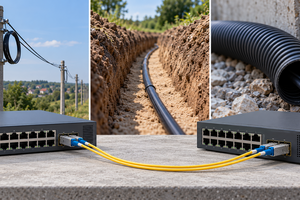
- How to Connect Two Network Switches with Fiber Optics: Over Poles, Underground or in Corrugated Conduit
- SC or LC: Which Fiber Optic Connector to Choose for a Patch Cord, SFP Module or Fiber Optic Box
- UPC or APC: Differences Between Blue and Green Fiber Optic Connectors
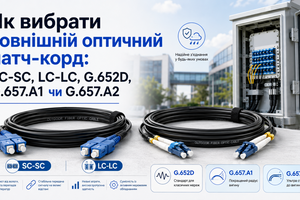
- How to Choose an Outdoor Fiber Optic Patch Cord: SC-SC, LC-LC, G.652D, G.657.A1 or G.657.A2
Conclusion
High-quality fiber optic fusion splicing depends not only on the fusion splicer itself but also on proper fiber preparation, precise cleaving, cleaning, choosing the correct splicing program and reliably protecting the connection.
Professional installation requires a fusion splicer, fiber optic stripper, precision cleaver, cleaning materials, heat-shrink splice protection sleeves and suitable fiber optic boxes, splice closures or splice trays.
If the fiber optic link needs to be connected to network equipment, fiber optic pigtails, adapters and patch cords are also used. After installation, it is important to verify actual optical losses and confirm proper link operation.
Looking for tools and accessories for fiber optic fusion splicing? At Net-Server, you can find fusion splicers, fiber optic strippers, splice protection sleeves, pigtails, splice trays, termination boxes, splice closures, patch cords and other equipment for building and maintaining fiber optic networks.
Explore Fiber Optic Fusion Splicers in the Net-Server Catalog