 zakaz@net-server.com.ua
How to Connect Two Switches Using Fiber Optics: On Poles, Underground, or in Corrugated Conduit
If you need to connect two switches, two buildings, an office and a warehouse, a house and a utility building, or a remote surveillance camera, fiber optics is often the preferred solution. However, it is important to choose not only the right SFP modules or media converters, but also the appropriate fiber optic cable, installation method, and mounting hardware.
In practice, the task looks simple: there is point A and point B. For example, one building contains a switch, while another needs a connection for an additional switch, camera, Wi-Fi access point, server cabinet, or other network equipment. However, the correct choice of cable and accessories depends on where the cable will run — along poles, underground, along a building facade, or inside corrugated conduit.
In this article, we explain how to connect two locations using fiber optics, what to choose for pole-mounted installations, when an underground cable is required, why conduit is useful, when a ready-made outdoor patch cord is suitable, and when fiber optic cable terminated by fusion splicing is the better choice.
When to Connect Two Locations Using Fiber Optics
Fiber optics is used when you need to transmit network signals over longer distances, establish a stable connection, or avoid problems associated with long copper cable runs.
Fiber optics is suitable for the following applications:
- connecting two switches in separate buildings;
- connecting an office and a warehouse;
- connecting a house and a garage;
- connecting a server room to a remote room or facility;
- connecting a surveillance camera at a distance;
- running a network link to a utility building;
- connecting two server cabinets;
- setting up FTTH / GPON / PON connections;
- connecting equipment through SFP modules or media converters.
The main advantage of fiber optics is that it is well suited to long distances, is immune to electromagnetic interference, and enables stable network connections between different locations.
What to Determine Before Choosing a Cable
Before purchasing a cable, first determine the exact route between point A and point B.
The main installation and connection options include:
- along poles or support structures;
- along a building facade;
- underground;
- inside corrugated conduit or protective ducting;
- inside a building;
- partly outdoors and partly indoors;
- between switches using SFP modules;
- through media converters if the equipment has no SFP port.
The same cable is not necessarily suitable for every environment. Indoor cable should not be installed outdoors. Outdoor cable is not always suitable for direct burial. A ready-made patch cord with connectors may also be difficult to pull through a pipe or narrow conduit.
Quick Guide: What to Choose for Different Installation Methods
| Task | Recommended Option | What to Check |
|---|---|---|
| Connect two switches in the same building | Fiber optic patch cord or indoor fiber optic cable | SFP modules, LC/SC, Simplex/Duplex, Singlemode/Multimode |
| Connect two buildings via poles | Outdoor aerial fiber optic cable or an outdoor FTTH patch cord | Outdoor suitability, tension clamps, crossarm, and proper attachment to the pole |
| Install fiber optics underground | Cable rated for underground installation or cable inside protective ducting / conduit | Mechanical protection, moisture, ground pressure, and potential damage |
| Install cable along a facade | Outdoor cable or cable inside conduit | Protection against sunlight, sharp bends, impacts, and accidental damage |
| Quickly connect a single location | Ready-made outdoor fiber optic patch cord | Length, connectors, UPC/APC, Simplex/Duplex |
Option 1: Connecting Switches Through SFP Modules
The preferred approach to connecting two switches is to use SFP modules and a fiber optic cable or patch cord. In this setup, an SFP module is installed in each switch, with a fiber optic link running between them.
A typical connection looks like this:
Switch A → SFP module → fiber optic cable → SFP module → Switch B
Before purchasing, check:
- whether the switches have SFP ports;
- which type of SFP module is required — standard or BiDi;
- which connector the SFP module uses — most commonly LC;
- whether one or two fibers are required;
- the distance between the locations;
- whether singlemode or multimode fiber is required;
- whether the cable will be installed indoors, outdoors, on poles, or underground.
If the switches are located in separate buildings, an ordinary indoor patch cord should not be used for the outdoor section. For outdoor installation, choose an outdoor fiber optic patch cord or fiber optic cable designed for outdoor use.
Option 2: If the Switch Has No SFP Port
If a switch does not have an SFP port, you can use a media converter. In this case, the fiber optic link connects to the media converter, which provides a standard RJ45 Ethernet port on the copper side.
The connection may look like this:
Switch A → RJ45 patch cord → media converter → fiber optic cable → media converter → RJ45 patch cord → Switch B
A media converter is useful when connecting fiber optics to equipment without an SFP slot. Before purchasing, check the optical port type, connector, wavelength, supported distance, and fiber type.
Option 3: A Ready-Made Outdoor Fiber Optic Patch Cord
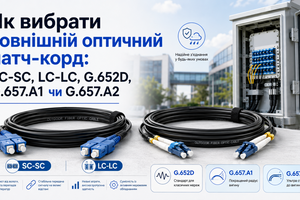
A ready-made outdoor fiber optic patch cord is a cable with optical connectors already fitted at both ends. Examples include SC-SC, LC-LC, and SC-LC. This option is convenient when you need to connect two locations quickly without fusion splicing.
A ready-made outdoor patch cord is suitable for:
- connecting a private house;
- FTTH / GPON / PON connections;
- connecting a fiber optic distribution box to equipment;
- connecting a remote location;
- connecting two buildings using a fixed-length cable;
- quick installation without a fusion splicer.
For example, you can use an SC-SC SM G.652D 150 m outdoor fiber optic patch cord if its specifications match your connection setup, required length, connector types, and installation conditions.
The advantage of a ready-made patch cord is installation speed. The disadvantage is that the connectors must be pulled through carefully to avoid damage, and the cable must not be bent sharply.
Option 4: Fiber Optic Cable for Fusion Splicing
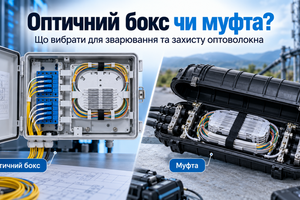
For a more professionally structured link, fiber optic cable terminated by fusion splicing is a better choice. The cable is installed between the locations, and the fibers are spliced inside distribution boxes, splice closures, or patch panels.
Choose fiber optic cable for fusion splicing when:
- a long cable run is required;
- you need 4, 8, 12, 24, or more fibers;
- spare capacity is needed for future expansion;
- the route runs along poles;
- the route will be underground;
- the installation requires a distribution box or splice closure;
- a reliable network is required for a business, warehouse, office, or production facility.
A ready-made patch cord is more commonly chosen for a single specific link. Cable for fusion splicing is used for networks that require spare capacity, multiple connections, and a more professionally organized cable route.
How to Install Fiber Optics on Poles
If the link will run along poles or support structures, use cable suitable for outdoor and aerial installation. The cable must withstand tension, temperature changes, sunlight, moisture, and wind.
For pole-mounted installations, common choices include:
- an outdoor FTTH patch cord when a ready-made solution with connectors is required;
- aerial fiber optic cable;
- dielectric cable for overhead lines;
- cable with strength members;
- singlemode fiber for longer distances;
- mounting hardware for securing the cable to poles.
Do not suspend cable that is not rated for the required tensile load. If the cable does not have a suitable construction, it may sag, become damaged, or cause an unreliable connection.
What Mounting Hardware Is Needed for Fiber Optic Cable on Poles?
When installing fiber optic cable on poles or support structures, it is important to secure it correctly rather than simply run it between two points. Dedicated mounting hardware is used for this purpose, including tension clamps, crossarms, brackets, and other fittings.
An aerial installation may require:
- a tension clamp for round cable up to 5.5 mm — for securing and tensioning fiber optic cable on a pole;
- a crossarm for attaching hardware to a pole — for mounting cable fittings on the support;
- cable fasteners — for neatly securing the cable along a facade, pole, or technical structure;
- spare cable near the entry point — for convenient maintenance, repairs, or reconnection.
A tension clamp helps secure the cable correctly and reduces the risk of sagging or damage during use. A crossarm provides a reliable mounting point for fittings on a pole, especially where the cable runs between supports.
When planning a pole-mounted fiber optic installation, include not only the cable or outdoor patch cord, but also the necessary mounting hardware. Otherwise, even a correctly selected cable may be difficult to install securely.
How to Install Fiber Optics Underground
If the route between point A and point B runs underground, cable selection requires particular care. Underground conditions introduce additional risks: moisture, ground pressure, stones, ground settlement, rodents, and damage from shovels or machinery.
For underground installation, suitable options include:
- fiber optic cable rated for underground installation;
- armored fiber optic cable;
- fiber optic cable inside HDPE ducting;
- fiber optic cable inside protective corrugated conduit;
- additional protection beneath paths, gates, yards, or driveways.
Not every outdoor cable can be buried directly in the ground. An outdoor-rated sheath does not necessarily protect against ground pressure or mechanical damage. For underground routes, choose cable with the appropriate rating or install it inside protective ducting.
When Is Corrugated Conduit Needed?
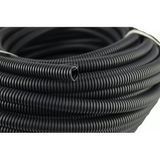
Corrugated conduit is used when cable requires additional protection against mechanical damage, abrasion, sharp bends, or contact with surfaces. It also helps keep the cable route neat and organized.
Conduit is used:
- along building facades;
- in technical rooms;
- in basements or attics;
- at cable entry points into buildings;
- near server cabinets or distribution boxes;
- where the cable could be accidentally snagged;
- underground, if the conduit is rated for this installation method.
Important: conduit does not make every cable suitable for underground installation. It only adds protection. If the cable will be installed underground, both the cable and the conduit must be selected for the relevant installation conditions.
Installation Along a Building Facade: What to Choose
If the fiber optic route runs along a facade, protect the cable against sunlight, rain, frost, sharp bends, and accidental damage. Facade-mounted cable is often installed inside conduit or another protective channel.
For facade installations, you can use:
- an outdoor fiber optic patch cord;
- outdoor fiber optic cable;
- corrugated conduit for additional protection;
- fasteners for neatly securing the cable;
- spare cable near the building entry point.
It is especially important to avoid sharp bends at corners, building entry points, and attachment points.
Simplex or Duplex for Connecting Switches
Simplex or Duplex indicates how many fibers are used in the patch cord or link.
| Connection Type | Number of Fibers | Typical Applications |
|---|---|---|
| Simplex | 1 fiber | GPON, FTTH, BiDi/WDM SFP, single-fiber connections |
| Duplex | 2 fibers | Standard SFP modules, TX/RX over separate fibers |
If an SFP module has two optical receptacles, a Duplex patch cord is usually required. If it is a BiDi SFP module with one optical port, a Simplex patch cord is needed. You can read more in the article Simplex or Duplex: How Fiber Optic Patch Cords with 1 and 2 Fibers Differ.
SC or LC: Which Connector Do You Need?
The connector type must match the equipment, adapter, fiber optic distribution box, or SFP module.
- SC is commonly used in fiber optic distribution boxes, FTTH, GPON, PON, and outdoor patch cords.
- LC is commonly used in SFP modules, media converters, and active network equipment.
- SC-LC is needed when one end connects to an SC distribution box or adapter and the other to an SFP module with an LC port.
Before purchasing, check both ends of the link. If one end requires SC and the other LC, you need an SC-LC patch cord rather than SC-SC or LC-LC.
UPC or APC: What to Check
UPC and APC are optical connector polish types. They must not be confused or mated with each other.
- UPC connectors or adapters are usually blue.
- APC connectors or adapters are usually green.
If a green APC adapter is installed in the distribution box or equipment, use an APC connector. If it is a blue UPC adapter, use UPC. You can read more in the article UPC or APC: What Is the Difference Between Blue and Green Fiber Optic Connectors?
Singlemode or Multimode
Singlemode fiber is most commonly used for outdoor links, building connections, GPON/FTTH, aerial installations on poles, and connections over longer distances. It supports longer transmission distances and is widely used in outdoor fiber optic networks.
Multimode fiber is more commonly used for short connections in server rooms, data centers, or within a facility when required by the equipment.
Ready-Made Patch Cord or Cable for Fusion Splicing
| Option | Advantages | When to Choose It |
|---|---|---|
| Ready-made outdoor patch cord | Quick installation, connectors already fitted, no fusion splicing required | When a single link needs to be connected quickly |
| Fiber optic cable for fusion splicing | Choice of fiber count, spare capacity, and a well-organized link | For long routes, networks with expansion capacity, multiple connections, or professional installations |
If you simply need to connect one location to another, a ready-made patch cord of the appropriate length is often sufficient. If you are building a network with future expansion in mind, fiber optic cable spliced in distribution boxes or splice closures is a better choice.
Example: A Switch in Building A and a Switch in Building B
Suppose you need to connect two switches located in separate buildings. Follow this selection process:
- Check whether both switches have SFP ports.
- Select SFP modules for the required distance.
- Determine whether 1 or 2 fibers are needed.
- Check the SFP connector type — usually LC.
- Determine the cable route: along poles, underground, along a facade, or inside conduit.
- Choose an outdoor patch cord or fiber optic cable for fusion splicing.
- If the route runs along poles, add tension clamps, a crossarm, or other mounting hardware.
- If the route runs underground or along a facade, provide conduit, ducting, or other protection.
- Add fiber optic distribution boxes, adapters, pigtails, or media converters as needed.
An aerial route requires cable suitable for outdoor or suspended installation, together with proper attachments to the supports. An underground route requires cable rated for underground installation or protection inside ducting or conduit. If the cable runs along a facade, additional protection against damage is advisable.
Common Mistakes When Connecting Two Locations Using Fiber Optics
- installing an indoor patch cord outdoors;
- burying an outdoor FTTH patch cord without protection;
- confusing aerial cable with underground cable;
- failing to use a tension clamp or proper pole attachment;
- omitting a crossarm or mounting hardware where required;
- failing to use conduit or ducting in areas where damage is possible;
- choosing cable based only on length without considering its construction;
- confusing SC and LC;
- confusing UPC and APC;
- buying Simplex when Duplex is required;
- buying Duplex when Simplex is required for BiDi or GPON;
- failing to check the SFP module type;
- leaving no spare cable near the distribution box or equipment;
- bending fiber optic cable sharply.
How to Choose the Right Solution: A Quick Checklist
To connect two locations correctly using fiber optics, answer the following questions before purchasing:
- What needs to be connected: a switch, media converter, camera, building, or server cabinet?
- What is the distance between point A and point B?
- Where will the cable run: along poles, underground, along a facade, or indoors?
- Does the equipment have SFP ports?
- Do you need a standard SFP module or BiDi?
- Is one fiber required or two?
- Which connectors are needed: SC, LC, or SC-LC?
- Is UPC or APC required?
- Do you need a ready-made patch cord or cable for fusion splicing?
- If the cable will run along poles, which clamps, crossarms, or fasteners are needed?
- If the cable will run underground or along a facade, is corrugated conduit, HDPE ducting, or additional protection required?
Once these questions are answered, you can select the appropriate cable, patch cord, SFP modules, media converters, distribution boxes, adapters, mounting hardware, and cable route protection.
Products Commonly Purchased Together for a Fiber Optic Link
To build a fiber optic link correctly between two locations, customers often order:
- outdoor fiber optic patch cords — for ready-made connections between locations;
- fiber optic cables — for routes along poles, underground, or between buildings;
- a tension clamp for round cable up to 5.5 mm — for securing and tensioning fiber optic cable on poles;
- a crossarm for attaching hardware to a pole — for mounting cable fittings on supports;
- corrugated conduit — for additional cable protection along facades, underground, or in technical areas;
- SFP modules — for connecting fiber optics to a switch or other equipment;
- media converters — when the equipment has no SFP port;
- fiber optic distribution boxes — for protecting and organizing connections;
- fiber optic patch panels — for installing fiber connections in a server cabinet;
- fiber optic pigtails — for fusion splicing to fiber optic cable;
- fiber optic adapters — for joining SC or LC connectors with the appropriate UPC or APC polish.
FAQ
How do you connect two switches using fiber optics?
Install SFP modules in both switches and connect them using fiber optic cable or a patch cord. Select the correct SFP type, connector, fiber count, fiber type, and cable for the installation conditions.
What if the switch has no SFP port?
You can use a media converter. It converts between RJ45 Ethernet and a fiber optic connection.
Which cable should you choose for installation on poles?
Use outdoor or aerial fiber optic cable rated for outdoor conditions, tension, moisture, sunlight, and temperature changes. You should also provide tension clamps, a crossarm, or other mounting hardware.
What is needed to secure fiber optic cable to a pole?
Securing fiber optic cable to a pole typically requires a tension clamp, a crossarm, or other mounting hardware. The tension clamp holds the cable and helps maintain proper tension, while the crossarm provides mounting points for fittings on the support.
Can a fiber optic patch cord be installed underground?
Do not bury an ordinary or even an outdoor patch cord without protection. For underground installations, use cable rated for underground use or install the cable inside protective ducting or conduit.
When is corrugated conduit needed?
Conduit provides additional protection against damage, abrasion, sharp bends, and contact with surfaces, and helps with installation in difficult locations.
What should you choose for an SFP module — Simplex or Duplex?
A standard SFP module with two optical receptacles usually requires Duplex. A BiDi/WDM SFP module with one optical port requires Simplex.
Which connector is more common in SFP modules — SC or LC?
Most SFP modules use LC connectors. However, check the specific module model before purchasing.
What should you choose for GPON or FTTH?
GPON or FTTH installations commonly use singlemode fiber, SC/APC Simplex connections, outdoor FTTH patch cords, fiber optic distribution boxes, pigtails, and adapters.
Which is better: a ready-made patch cord or cable for fusion splicing?
A ready-made patch cord is convenient for quickly connecting a single link. Cable for fusion splicing is better suited to professional networks, long routes, spare fiber capacity, and multiple connections.
Should you leave spare cable?
Yes. It is advisable to leave spare cable near the distribution box, cabinet, media converter, switch, or building entry point. This makes maintenance and repairs easier.
Useful Articles
- How to Choose an Outdoor Fiber Optic Patch Cord
- Simplex or Duplex: How Fiber Optic Patch Cords with 1 and 2 Fibers Differ
- SC or LC: Which Fiber Optic Connector Should You Choose?
- UPC or APC: What Is the Difference Between Blue and Green Fiber Optic Connectors?
- What Is an SFP Module and How Do You Choose One?
Conclusion
To connect two switches or two locations correctly using fiber optics, start with the installation conditions rather than cable length. If the route runs along poles, you need outdoor or aerial fiber optic cable, together with a tension clamp, crossarm, or other mounting hardware. If the route runs underground, you need cable rated for underground installation or protection inside conduit or ducting. If you need to connect a single location quickly, a ready-made outdoor fiber optic patch cord may be suitable.
It is also important to select the correct SFP modules or media converters, fiber type, SC or LC connectors, UPC/APC polish, and Simplex or Duplex configuration.
Need help choosing fiber optic equipment to connect point A and point B? Net-Server specialists can help you select an outdoor fiber optic patch cord, aerial cable, underground cable, corrugated conduit, tension clamps, crossarms, SFP modules, media converters, fiber optic distribution boxes, pigtails, and adapters for your application.